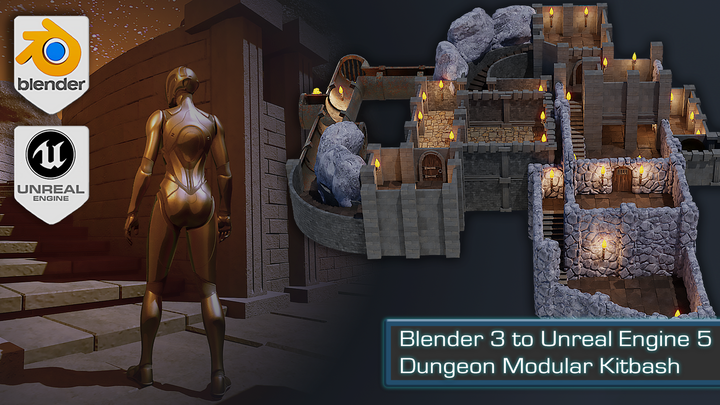
Blender 3 to Unreal Engine 5 Dungeon Modular Kitbash Course
Replay
WATCH NEXT FREE LESSON
Preview this course
1,789
English
$0.00 × 1
$79.00 $79.00 0 %off
$0.00 ×
1
$75.05
Buy Now
Add to cart
This course includes:
26
hours video
1
downloadable resource
Lifetime Access
Beginner / Intermediate


Gift this course
Share Get the 18% off
-- : -- : -- : --

Blender 3 to Unreal Engine 5 Dungeon Modular Kitbash Course
$79.00 $79.00 0%off
Plus's Price $75.05
Add to cart
Go to cart
Buy Now
Full Payment
Pre-registeration
Blender 3 to Unreal Engine 5 Dungeon Modular Kitbash Course
1,789
English
This course includes:
26
hours video
1
downloadable resource
Lifetime Access
Beginner / Intermediate


Gift this course
Share Get the 18% off
-- : -- : -- : --
136
Lessons
(Finish)
Blender Basics, HDRI Lighting & Asset Manager
Introduction
(4m 43s)
The Basics of Blender
(12m 24s)
Importing Reference Images
(10m 56s)
The Importance of Seams & Sharps
(26m 29s)
Working with HDRI Lighting
(11m 24s)
What is Transformation Orientation
(8m 54s)
Working with Blender's Asset Manager
(12m 15s)
Basic Mesh Tools & Modifiers
How to Create Edge Loops
(10m 57s)
Creating Variation in Meshes
(9m 3s)
Working with the Array Modifier
(12m 58s)
Creating our First Modular Piece, Mid-Level Geometry & Modifier Stacking
Creating our First Dungeon Wall
(11m 35s)
How Smoothing Works in Blender
(10m 35s)
Techniques for Creating Geometry
(11m 27s)
Taking UV Unwrapping to the Next Level
(11m 54s)
Creating our Large Wall Modular Pieces
(11m 4s)
Fixing Issues with Our Large Brick Walls
(10m 7s)
What is Modifier Stacking
(12m 4s)
UV Options & Creating Smaller Assets
Creating the Bottom Walls
(11m 43s)
Creating our Small Grate
(12m 8s)
Creating the Top Walls
(11m 27s)
Doors, Hinges, Handles & More Complex Geometry
Starting our Dungeon Doors
(12m 11s)
Working with Proportional Editing
(12m 39s)
Adding Realism to Our Models
(10m 53s)
Finishing our Dungeon Door Meshes
(11m 28s)
Creating Hinges & Handles the Easy Way
(10m 59s)
Finishing our Dungeon Doors
(10m 6s)
Creating Ornate Pillars
(11m 19s)
Creating the Ornate Wall Supports
(11m 46s)
Basic Sculpting, Stairs & Door Arches
Basic Sculpting Setup in Blender
(8m 51s)
Importing Custom Brushes to Blender
(11m 50s)
Creating our First Stairs
(13m 13s)
Finishing our Straight Stairs
(11m 23s)
Working with Boolean Modifier
(12m 33s)
Modeling the Modular Door Walls
(10m 30s)
Outlining our Door Arches
(11m 1s)
Creating the Door Arches
(11m 53s)
Adding Materials to our Door Arches
(8m 53s)
Using the Simple Deform Modifier
(11m 40s)
Finishing the Spiral Stair Mesh
(14m 56s)
Building a Vault & Brazier
Creating the Vault Wall
(11m 32s)
Parenting Objects and Keeping Transform
(10m 25s)
Creating the Brazier Mesh
(10m 26s)
Creating the Hot Coals
(9m 24s)
Dungeon Lighting & The Ultimate Guide to Flames
Creating the Ornate Torch
(12m 29s)
Creating the Torch Handle & Holder
(11m 28s)
Finishing our Torch Models
(12m 30s)
Creating our Animated Flame
(9m 48s)
Setting up our Flame Node Tree
(10m 31s)
Setting up the Light Flicker Effect
(8m 41s)
Creating the Flame Embers
(12m)
Finishing the Dungeon Modular Pack
(11m 6s)
Dungeon Layout & Using Modular Pieces in Different Ways
Building the Dungeon Sewer System
(12m 28s)
Creating our First Dungeon Room
(12m 2s)
Starting the Library Room
(11m 58s)
Finishing the Dungeon First Floor
(10m 25s)
Starting the Dungeon Armory
(11m 25s)
Creating Under Flooring
(16m 41s)
Building the Dungeon Kitchens
(11m 33s)
Creating the Dungeon Mid-level
(9m 42s)
Creating the Dungeon Prison
(11m 7s)
Finishing the Dungeon Main Build
(9m 47s)
Placing our Torches Throughout the Dungeon
(10m 58s)
Working with Cameras, Different Render Engines & Collections before Exporting to UE5
Setting up our Camera
(9m 43s)
Rendering with Eevee Renderer
(8m 49s)
Rendering with Cycles X Render Engine
(12m 57s)
Setting up Collections
(10m 18s)
Setting up Assets for Unreal Engine 5
(12m 26s)
Final Blender 3 Finishing Preparation
(8m 9s)
Unreal Engine 5 Basics & Importing 3D Assets
Creating New UE5 Project
(3m 14s)
Introduction to UE5 UI
(11m 11s)
Introduction to UE5 Viewport Controls
(9m 4s)
Creating a New Level and Importing Assets
(13m 25s)
Setting Up a Basic PBR Material
(17m 40s)
Setting up Emissive Materials
(9m 37s)
Replacing Material References
(13m 50s)
Mesh Collisions & Environment Set up
Sorting out Kitbash Assets
(12m)
Setting up Kitbash Assets in Order
(13m 27s)
Creating Asset Colour Adjustments
(13m 49s)
Creating Mesh Collisions
(11m 45s)
Generating Custom Collisions
(12m 50s)
Generating Collisions for Complex Shapes
(11m 29s)
Setting up Background Environment
(14m 3s)
Creating a Lava Base Material
(10m 20s)
Creating Motion for a Lava Material
(11m 2s)
Setting up Lava as a PBR Material
(9m 3s)
Building up the Dungeon in UE5
Building a Sewer System
(15m 58s)
Building a Staircase and our First Modular Room
(11m 1s)
Creating our First Room
(15m 3s)
Creating the Library Room
(16m 47s)
Changing the Main Viewpoint
(13m 37s)
Starting the Armory Room
(10m 33s)
Creating Two-Tier Rooms
(10m 3s)
Finishing the Armory Room
(11m 6s)
Working with Elevation & Building Hidden Rooms
Setting out the Pantry Room
(11m 14s)
Working with Different Lighting Modes
(10m 58s)
Learning how to Adapt Assets
(14m 59s)
Laying out our Prison
(12m 30s)
Working with Colliders
(16m 11s)
Creating the Treasure Room Hallway
(11m 44s)
Bringing our Dungeon Design Together
(15m 20s)
Adding in the Bottom Walls
(14m 54s)
Adding in the Final Doors
(7m 5s)
Interactable Doors & Creating Custom Holes in a Mesh
Setting up a Door Blueprint
(8m 13s)
Creating Interactable Door Blueprint Animation
(10m 47s)
Setting up a Door Blueprint with Specified Distance Activation
(10m 21s)
Creating Blueprints for our Door
(8m 53s)
Animating all our Modular Doors
(12m 48s)
Fixing the Door Collisions
(12m 12s)
Creating Manhole Floor Covers
(15m 5s)
UE5 Water Materials & Creating a Sewer Waterfall
Setting up Water Mesh for Sewer
(17m 48s)
Creating Water Material
(8m 53s)
Creating Additional Control for our Water Material
(8m 18s)
Setting up the Water Flow Material Animation
(10m 47s)
Setting up the Water Material Parameters
(13m 23s)
Creating a Waterfall using Mesh
(14m 51s)
Creating a Niagara Particles System for Water
(11m 25s)
Creating a Niagara Particles System for Water
(12m 14s)
Creating a Base Splash Particle
(10m 29s)
Setting up Waterfall Particle Curve Graph Parameters
(8m 14s)
Setting up a Base Splash Particle
(6m 10s)
Creating Animated Particle Splash
(11m 14s)
Setting up the Waterfall Splash
(12m 48s)
Fire Fluid Simulation & Setting up a Torch Blueprint
Setting up Niagara Fire Fluid Simulation
(13m 19s)
Creating Fire Simulation for Torches
(14m 9s)
Baking out Fire Particle Animations
(14m 12s)
Creating Animated Fire Particle Material
(8m 30s)
Setting up Fire Particle Texture
(8m 17s)
Creating Niagara Fire Particle System
(12m 48s)
Adding Ember Particles to our Fire System
(12m 34s)
Creating a Torch Blueprint
(6m 46s)
Setting up Light Flicker Effect
(8m 57s)
Setting up Torch Blueprint Variations
(13m 9s)
Setting up Final Decorations & Visuals for our 3D Level
Placing Light Sources Within our Dungeon
(14m 58s)
Placing Rock Asset Decorations
(10m 3s)
Setting up Lighting for our UE5 Scene
(14m 7s)
Colour Grading Using Post Process Volume
(14m 7s)
You must be purchased to post a comment.
Buy Now !
Start a Conversation
Ask a Question
Share a Project
Cancel
Post
There are no discussions for this course.
Buy now and unlock more
Go to see all discussions
Lecturer
3D Tudor
Please select the mode you want
Single
$
3 people
$x3
$79.00
$75.05
Add to cart
Go to cart
Buy Now


